overwolf.settings.hotkeys API
Use this API to view and modify the Overwolf hotkeys settings properties.
Please read all the info about hotkeys and how to use them in our hotkeys best practice guide.
Implementing Hotkeys
Use the following sections to implement the Hotkeys Guidelines.
Get notified on a Hotkey change
It is important to notify users if there has bee a change in hotkey assignment. To notify the user of the change you need to listen to the overwolf.settings.hotkeys.onChanged event. Notifications can be sent when changes to hotkeys are done by an app or through the Overwolf Settings page.
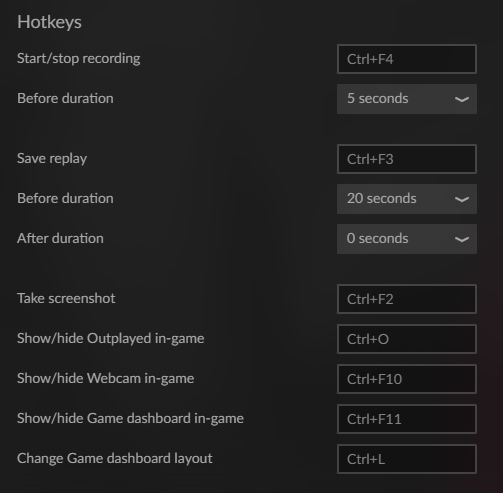
Reassign Hotkeys
You should provide users a method to assign/reassign their hotkeys directly from within your app.
To provide users with this option, use:
overwolf.settings.hotkeys.get()—get the current values of your app's hotkeys.overwolf.settings.hotkeys.assign()—assign a new value for an app hotkey.overwolf.settings.hotkeys.onChanged—fires when an app's hotkey value changes.overwolf.settings.hotkeys.unassign()—unassign the specified app hotkey.
Use these APIs in the correct order to create a hotkeys editor for your app's settings screen.
Passthrough
You can set a hotkey as passthrough so that the hotkey will not interfere with other keys in the game.
The key combination will trigger your app hotkey and then will passthrough the game.
For more information, see Set the hotkey in the manifest.json file.
Example of a passthrough hotkey:
"hotkeys": {
    "show_YourAppName": {
        "title": "Show Player",
        "action-type": "custom",
        "default": "Shift+F9",
        "passthrough": true,
    },
}
Methods Reference
- overwolf.settings.hotkeys.update()
- overwolf.settings.hotkeys.get()
- overwolf.settings.hotkeys.getAllApps()
- overwolf.settings.hotkeys.assign()
- overwolf.settings.hotkeys.unassign()
Events Reference
- overwolf.settings.hotkeys.onHold
- overwolf.settings.hotkeys.onPressed
- overwolf.settings.hotkeys.onChanged
Types Reference
- overwolf.settings.hotkeys.GetAssignedHotkeyResult Object
- overwolf.settings.hotkeys.GetAllAssignedHotkeysResult Object
- overwolf.settings.hotkeys.IHotkey Object
- overwolf.settings.hotkeys.OnHoldEvent Object
- overwolf.settings.hotkeys.OnPressedEvent Object
- overwolf.settings.hotkeys.OnChangedEvent Object
- overwolf.settings.hotkeys.UpdateHotkeyObject Object
- overwolf.settings.hotkeys.AssignHotkeyObject Object
- overwolf.settings.hotkeys.UnassignHotkeyObject Object
- overwolf.settings.hotkeys.HotkeyModifiers Object
update(hotkey, callback)
Version added: 0.208
Permissions required: Hotkeys
Update a hotkey for the current extension.
Notes
- You can only update hotkeys that pre-defined in your manifest. Please read all the info in our hotkeys best practice guide.
| Parameter | Type | Description |
|---|---|---|
| hotkey | UpdateHotkeyObject object | The hotkey to update |
| callback | (Result) => void | Reports success or failure |
assign(hotkey, callback)
Version added: 0.160
Permissions required: Hotkeys
Assign global hotkey for the current extension, OR, if a gameId is specified, assign/unassign a dedicated hotkey.
Notes
- You can assign only hotkeys that pre-defined in your manifest.
- You can assign a global hotkey (means - not send a game id) through the API only if your app is targeted in the manifest to more then one game (or to all games). Please read all the info in our hotkeys best practice guide.
| Parameter | Type | Description |
|---|---|---|
| hotkey | AssignHotkeyObject object | The hotkey to assign |
| callback | (Result) => void | Reports success or failure |
Usage example
newHotkey = {
  name: <name-of hotkey>,
  gameid: <only use if applicable>,
  virtualKey: 75,
  modifiers: {
    ctrl: true //shift
  }
};
overwolf.settings.hotkeys.assign(newHotkey, console.log)
The virtualKey is an integer representation of the key, not the character, and as such, it corresponds to the keyDown event. You can read more about it here.
unassign(hotkey, callback)
Version added: 0.160
Permissions required: Hotkeys
Unassign global hotkey for the current extension, OR, if a gameId is specified, assign/unassign a dedicated hotkey.
| Parameter | Type | Description |
|---|---|---|
| hotkey | UnassignHotkeyObject object | The hotkey to unassign |
| callback | (Result) => void | Reports success or failure |
Usage example
hotkey = {
  name: <name-of hotkey>,
  gameid: <only use if applicable>
};
overwolf.settings.hotkeys.unassign(hotkey, console.log)
get(callback)
Version added: 0.142
Permissions required: Hotkeys
Returns the hotkeys assigned for the current App in all the games.
| Parameter | Type | Description |
|---|---|---|
| callback | (Result: GetAssignedHotkeyResult) => void | A callback receiving the result of the operation |
getAllApps(callback)
Version added: 0.236
Permissions required: Hotkeys
Returns the hotkeys assigned for all Apps + the Overwolf Platform in all the games.
| Parameter | Type | Description |
|---|---|---|
| callback | (Result: GetAllAssignedHotkeysResult) => void | A callback receiving the result of the operation |
onHold
Version added: 0.142
Fired only for hotkeys that are set in the manifest as
hold, with the following structure: onHold Object
- Triggered only for the current extension hotkeys.
- This event will be fired twice - on key down and on key up.
onPressed
Version added: 0.142
Fired for hotkeys that are NOT set as hold hotkeys, with the following structure: OnPressedEvent Object
- Triggered only for the current extension hotkeys.
- This event will replace the deprecated overwolf.settings.registerHotKey() function, as a way to register for hotkey events.
OnChanged
Version added: 0.142
Fired on hotkey setting change, with the following structure: OnChangedEvent Object
- Triggered only for the current extension hotkeys.
- Listen to this event if you want to get notified when the user changed your app hotkeys from the OW client settings page.
IHotkey Object
Version added: 0.142
Container for hotkey properties.
| Parameter | Type | Description |
|---|---|---|
| name | string | |
| title | string | |
| virtualKeycode | number | |
| modifierKeys | number | |
| extensionuid | string | |
| isPassthrough | boolean | |
| customModifierKeyCode | number | |
| hold | boolean | |
| IsUnassigned | boolean | |
| binding | string |
Example data
{
    "binding":"Ctrl+F3",
    "name":"shots_fired_toggle_visibility",
    "title":"Show In-Game",
    "virtualKeycode":114, //F3
    "modifierKeys":2, //Ctrl
    "binding": "Ctrl+F3",
    "extension-uid":"jdecmlblpoddjcmpdbhnefehffjfcjeijpkebedd",
    "isPassthrough":false,
    "hold":false,
    "IsUnassigned":false
}
GetAssignedHotkeyResult Object
Version added: 0.142
Container for the assigned hotkeys.
| Parameter | Type | Description |
|---|---|---|
| success | boolean | Inherited from the "Result" Object |
| error | string | Inherited from the "Result" Object. null if success is true |
| globals | IHotkey[] | |
| games | object |
Callback example
In the following example, we can see a callback example of an extension that set the same hotkeys (Ctrl + F3) for PUBG and Legends of Runeterra. Of course, you can set different hotkeys for different games.
}
    "success":true,
    "globals":[], //see the next example for more details on this array
    "games":{
        "10906":[  //PUBG
        {
            "binding":"Ctrl+F3",
            "name":"shots_fired_toggle_visibility",
            "title":"Show In-Game",
            "virtualKeycode":114, //F3
            "modifierKeys":2, //Ctrl
            "binding": "Ctrl+F3",
            "extension-uid":"jdecmlblpoddjcmpdbhnefehffjfcjeijpkebedd",
            "isPassthrough":false,
            "hold":false,
            "IsUnassigned":false
        }
        ],
        "21620":[ // Legends of Runeterra
        {
            "binding":"Ctrl+F3",
            "name":"shots_fired_toggle_visibility",
            "title":"Show In-Game",
            "virtualKeycode":114, //F3
            "modifierKeys":2, //Ctrl
            "binding": "Ctrl+F3",
            "extension-uid":"jdecmlblpoddjcmpdbhnefehffjfcjeijpkebedd",
            "isPassthrough":false,
            "hold":false,
            "IsUnassigned":false
        }
        ]
    }
}
Notes
- The "binding" field that the callback returns gives you a human-readable hotkey name. ("Ctrl+F3" for example)
- The callback returns a virtualKeycode and a modifierKey code. You can convert these values easily to a string using the MS ModifierKeys Enum and the MS VirtualKey Enum.
- If several modifier keys are assigned (like Ctrl + Shift), the
modifierKeysis the sum of all the modifier values (e.g. Alt + Shift would be 5)
Callback example with global hotkeys
For extensions that target more than one game (global apps), there is an option that available in the OW client UI, to set an extension hotkey as global.
Read more about global hotkeys here.
On the following example, you can see that the current extension set Shift + F5 as a global hotkey for all the installed games:
{
    "success":true,
    "globals":[
    {
         "binding":"Ctrl+F3",
         "name":"toggle_app",
         "title":"Show/Hide Buff window",
         "virtualKeycode":116, //F5
         "modifierKeys":4, //Shift
         "extension-uid":"caboggillkkpgkiokbjmgldfkedbfnpkgadakcdl",
         "isPassthrough":false,
         "hold":false,
         "IsUnassigned":false
    }
    ]
}
On the following example, you can see that the current extension set Shift + F5 as a global hotkey for all the installed games,except "League of Legends", which set with Ctrl +D:
{
    "success":true,
    "globals":[
    {
         "binding":"Ctrl+F3",
         "name":"toggle_app",
         "title":"Show/Hide Buff window",
         "virtualKeycode":116, //F5
         "modifierKeys":4, //Shift
         "extension-uid":"caboggillkkpgkiokbjmgldfkedbfnpkgadakcdl",
         "isPassthrough":false,
         "hold":false,
         "IsUnassigned":false
    }
    ],
    "games":{
        "5426":[
        {
            "binding":"Ctrl+F3",
            "name":"toggle_app",
            "title":"Show/Hide Buff window",
            "virtualKeycode":68, //D
            "modifierKeys":2, //Ctrl
            "extension-uid":"caboggillkkpgkiokbjmgldfkedbfnpkgadakcdl",
            "isPassthrough":false,
            "hold":false,
            "IsUnassigned":false
        }
        ]
    }
}
GetAllAssignedHotkeysResult Object
Version added: 0.236
Container for the assigned hotkeys.
| Parameter | Type | Description |
|---|---|---|
| success | boolean | Inherited from the "Result" Object |
| error | string | Inherited from the "Result" Object. null if success is true |
| apps | { [appID: string]: [GetAssignedHotkeyResult](#getassignedhotkeyresult-object) } | |
| platform | IHotkey[] |
OnHoldEvent Object
| Parameter | Type | Description |
|---|---|---|
| name | string | |
| state | string ("down"/"up') |
Event data example
{"name": "ges_showhide", "state": "down"}
OnPressedEvent Object
| Parameter | Type | Description |
|---|---|---|
| name | string |
Event data example
{"name": "ges_showhide", "state": "down"}
OnChangedEvent Object
| Parameter | Type | Description |
|---|---|---|
| name | string | |
| gameId | number | |
| description | string | |
| binding | string |
Event data example
{
   "name":"toggle_app",
   "gameId":10906,
   "description":"Buff Achievement Tracker: Show/Hide Buff window",
   "binding":"Shift+F4" //the new hotkey
}
UpdateHotkeyObject Object
Version added: 0.208
Container for updated hotkey properties.
| Parameter | Type | Description |
|---|---|---|
| name | string | Name of the hotkey |
| gameId | number | Optional id of the game the hotkey is for |
| customModifierKeyCode | number | Optional code for the optional custom modifier key used for this key |
| isPassThrough | boolean | Optional new value for whether or not the keybind should allow passthrough |
AssignHotkeyObject Object
Version added: 0.160
Container for assigned hotkey properties.
| Parameter | Type | Description |
|---|---|---|
| name | string | |
| gameId | number | |
| modifiers | HotkeyModifiers object | |
| virtualKey | number |
UnassignHotkeyObject Object
Version added: 0.160
Container for unassigned hotkey properties.
| Parameter | Type | Description |
|---|---|---|
| name | string | |
| gameId (optional) | number |
HotkeyModifiers Object
Version added: 0.160
Container for hotkey modifiers.
| Parameter | Type | Description |
|---|---|---|
| ctrl | boolean | |
| alt | boolean | |
| shift | boolean |